
What is Co-Teaching?
The Co-Teaching feature allows teachers to share instructional sessions with other educators working with the same students (same class). This makes it easier to collaborate, coordinate instruction, and support student learning.
How to Add a Co-Teacher at Session Creation
-
Log in to Ori Learning and assign a lesson to your students as you normally would.
-
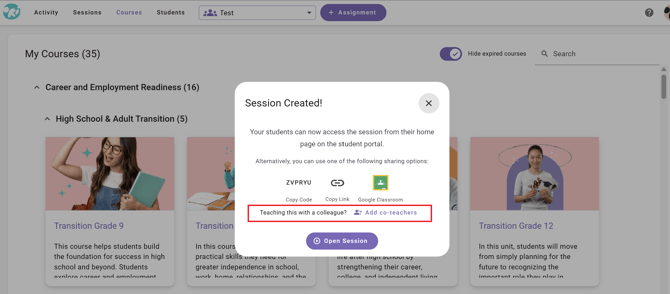
Once your session has been created, the Session Created! window will appear. This window provides several options for sharing your session, including a new Add co-teachers option.
-
To share your session with a colleague, select Add co-teachers at the bottom of the window.
-
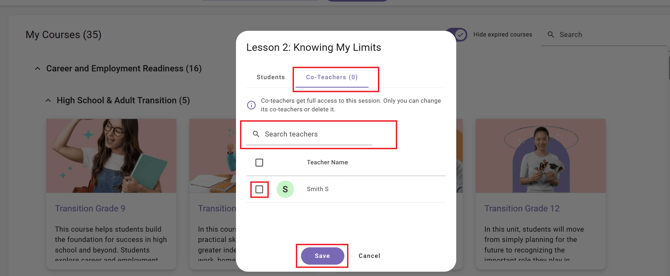
The Co-Teachers window will open, displaying the teachers assigned to your classroom.
-
You can find a teacher in two ways:
-
Select from the list: Review the teachers displayed in the window.
-
Search for a teacher: Use the Search teachers field to locate a specific educator.
-
-
-
Check the box next to the name of the teacher you want to add. You can select more than one teacher if multiple educators will be collaborating on the session.
-
Once you have selected your co-teacher(s), click Save at the bottom of the window. Your selected co-teachers will now have access to the shared session.
How to Add a Co-Teacher at Session Creation
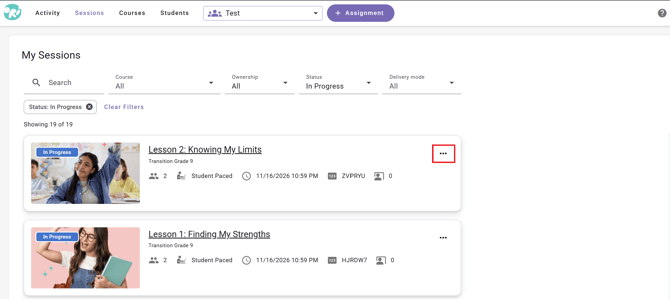
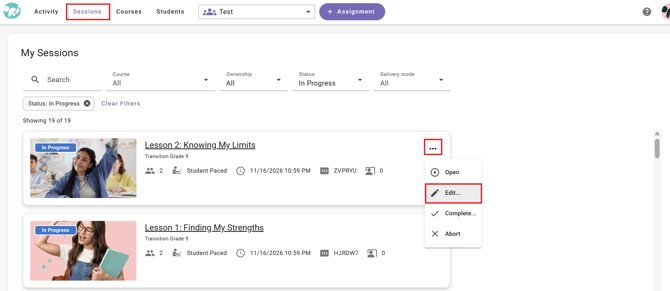
- Navigate to the 'Session' tab and locate the session you would like to add a co-teacher to.
- Click the three dots menu on the right side of the session tile.
- Select the 'Edit" option.
- Choose the 'Co-Teachers' tab.
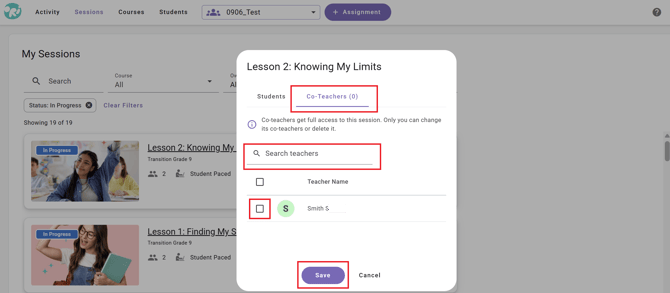
- The Co-Teachers window will open, displaying the teachers assigned to your classroom.
-
You can find a teacher in two ways:
-
Select from the list: Review the teachers displayed in the window.
-
Search for a teacher: Use the Search teachers field to locate a specific educator.
-
-
-
Check the box next to the name of the teacher you want to add. You can select more than one teacher if multiple educators will be collaborating on the session.
-
Once you have selected your co-teacher(s), click Save at the bottom of the window. Your selected co-teachers will now have access to the shared session.
Important Information About Co-Teaching
- Full Session Access: Co-teachers receive full access to the shared session.
- Session Management: Only the teacher who originally created the session can add or remove co-teachers or delete the session.
- Multiple Co-Teachers: You can add more than one teacher to a session.
Still need help?
Include:
- the student's username and class name
- the lesson and the accommodation that isn't working
- the device and browser
- the exact message on screen, if any
Send us a request — or, if someone is available, chat with us. You can also email support@orilearning.com with the same details.
What happens next: we'll acknowledge your request, come back to you if we need to confirm anything, and tell you when it's done.