-1.png?width=100&height=95&name=logo%20(1)-1.png)
Admins sign in at app.orilearning.com/admin, or with 'Admin Sign In' on the Ori home page. Your admin access is part of your own Ori account, not a separate account.
For: school (site) admins and district admins
Sign in to the admin portal
If you also teach, use the same username and password, or the same 'Sign In with …' button, for the teacher portal and the admin portal.
- Go to app.orilearning.com/admin, or click 'Admin Sign In' on the Ori home page, app.orilearning.com.
- On the 'Administration' page, type your 'Username' and 'Password' and click 'Sign In', or click your district's 'Sign In with …' button.
The admin portal opens.
For a tour of the admin portal, see What's in the admin portal. For what each kind of admin can do, see School (site) admins and district admins: what each can do.
Open the admin portal from the teacher portal
- In the teacher portal, click your initials at the top right.
- Click 'Administration'.
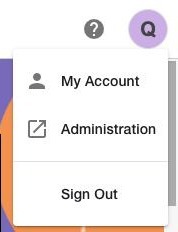 The menu under your initials in the teacher portal.
The admin portal opens in a new tab. In the admin portal, the same menu has 'My Account' and 'Sign Out', plus 'Teacher Portal' if you also teach.
If you don't see 'Administration'
In the teacher portal, the menu under your initials has 'My Account' and 'Sign Out'. School and district admins also see 'Administration'. If you don't see 'Administration', your account doesn't have admin rights.
Only accounts with admin rights can use the admin portal. If you sign in there without admin rights, Ori signs you out and shows You are now logged out. If you need admin access, ask your district admin. Don't know who your district admin is? We'll tell you their name.
Sign in with Google, Microsoft, Clever or ClassLink
If your district uses Google, Microsoft, Clever or ClassLink, click that 'Sign In with …' button and leave 'Username' and 'Password' empty. If you're taken to a Google, Microsoft, Clever or ClassLink page, sign in there with your school account. They're the same buttons as on the teacher sign-in page, described in Sign in as a teacher.
If you forgot your password
If your account has an email address, you can reset your own password from the sign-in page. 'Forgot password?' is on the 'Administration' page too; the steps are in Sign in as a teacher.
Ori never asks for your password and never sends a password by email, chat or phone.
Still need help?
Include:
- Your username or email address, and your school or district
- How you sign in: 'Username' and 'Password', or which 'Sign In with …' button
- Whether you're stuck on the 'Administration' page or can't find 'Administration' in the menu
- The exact message you see, if any
Send us a request — or, if someone is available, chat with us. You can also email support@orilearning.com with the same details.
What happens next: we'll acknowledge your request, come back to you if we need to confirm anything, and tell you when it's done.